
According to market analysis by Fortune Business Insights, document workflow automation is now one of the key drivers of business growth. In 2024, the global electronic document management systems (EDMS) market was valued at USD 7.16 billion, and growth has continued to accelerate since then. By 2032, the market is expected to nearly triple, reaching USD 24.34 billion. A compound annual growth rate of 16.6% sends a clear signal: businesses are rapidly moving away from paper-based and manual document workflows toward digital solutions that enable faster, more secure, and more scalable operations.
The analysis also shows that demand for DMS (Document Management Systems) is growing across virtually all sectors of the economy. In 2024, the largest share was held by the financial sector (BFSI) at 22%, which is expected, as financial institutions handle large volumes of document flows subject to strict regulatory requirements. Across other industries — such as healthcare, manufacturing, retail, real estate, the public sector, IT and telecommunications, education, and others — the market is distributed relatively evenly. This indicates a high level of diversification and highlights the universal need for document workflow automation, which has become an integral part of business transformation.
What Is Electronic Document Management System (EDMS)?
An Electronic Document Management System (EDMS) is a comprehensive software solution for the exchange and processing of electronic documents in digital format. It serves as a modern and more efficient alternative to traditional paper-based document management, enabling companies to effectively create, edit, sign, register, store, and transfer electronic documents within a digital environment.
EDM covers the entire document lifecycle — from creation and approval to storage, archiving, and secure exchange among all participants in the process. Specialized solutions support this workflow by providing structured storage, version control, approval routing, the ability to use a qualified electronic signature (QES) and secure data exchange.
Benefits of Using an EDMS
Implementing electronic document management software provides businesses with tangible advantages on several levels:
- Process optimization for document creation, approval, and signing — documents are created, reviewed, and signed faster, without unnecessary delays or duplication of information.
- Improved accuracy and reduced risks — automated data population, version control, and routing minimize errors caused by the human factor.
- Security and regulatory compliance — encryption, audit trails, and digital signatures ensure data protection and compliance with legal requirements.
- Centralized storage and easy access — all electronic documents are stored in a single repository, enabling quick search and full visibility of change history.
- Scalability and integration — an EDMS easily integrates with ERP, CRM, and other systems, while the platform scales alongside the business.
Thanks to these benefits of using an EDMS, it becomes a foundation for effective digital transformation within a company.
Who Needs EDMS
Electronic document management systems are especially relevant for companies with a high volume of operations, complex organizational structures, and active collaboration with contractors. They are particularly valuable in industries where the speed of document approval and process control directly impacts financial performance:
- Retail — an industry with numerous outlets, suppliers, and contracts, where it is essential to centralize document creation and approval processes, ensure fast exchange with contractors, and maintain transparent control across the network. This also includes HoReCa and chain-based services, as these businesses operate distributed networks that require process standardization, centralized control, and prompt approval of both internal and external documents.
- Distribution — businesses with continuous movement of goods and documents between warehouses, partners, and retail chains, where clear approval workflows, version control, and minimized process delays are critical.
- Manufacturing — enterprises with complex regulations, technical documentation, and multi-level approvals, where traceability of changes, compliance with internal standards, and audit readiness are essential.
- Logistics and transportation — companies for which the speed of document exchange and accuracy of supporting documentation directly affect operational efficiency and fulfillment of contractual obligations.
- Financial sector — organizations with strict requirements for data security, internal controls, and regulatory compliance, where every document must be protected, traceable, and properly approved.
- Telecom and Internet providers — companies with complex contract structures and large customer bases, where systematic document management and fast request processing are key.
Why Paper-Based Document Workflows Are Increasingly Becoming a Barrier for Modern Businesses
Despite active digitalization and the transition to electronic document management, paper documents remain one of the most common barriers to efficient operations. Every manual signature, physical document transfer, or search for a paper copy slows processes down and consumes time that teams could otherwise dedicate to higher-value tasks. As a result, more organizations are transitioning to electronic document management as a foundational step toward improving operational speed, strengthening security, and enhancing collaboration across departments.
Types of Electronic Document Management
EDM can be classified based on various criteria, such as document types and data exchange volumes. Below are more detailed descriptions of the main types, along with a classification by document type:
- Internal — This type involves document exchange within a single organization. It is used to optimize internal workflows, simplify communication between departments, and accelerate decision-making. Internal electronic document management may cover a wide range of documents, including HR, administrative, inventory, accounting, archival, and more.
- External — This type of EDM includes the transfer of data and documents between companies, government institutions, and partners and counterparties. It helps automate document exchange processes, reduce errors, and shorten the time required for processing and approvals. External electronic document management may include records related to orders, contracts, invoices, logistics, licenses, and more.
Classification by Document Type:
- Managerial — Documents related to management activities, including reports, presentations, development plans, strategic documents, and more. They are used to support decision-making at various levels of management.
- Warehouse — Associated with warehouse and inventory management, including waybills, goods acceptance and transfer certificates, inventory records, stock reports, and more.
- Accounting — Pertains to financial accounting and reporting, including invoices, tax returns, income and expense statements, financial reports, and similar documents.
- Archival — Covers records that must be preserved in archives for extended periods. These may include documents on internal operations, contracts, reports, extracts from meeting minutes, internal orders, and more.
This classification covers only the primary document types within the context of electronic document management. Additional specialized categories may exist depending on the needs of a particular organization or industry.
Key Features of an Electronic Document Management System (EDMS)
By 2026, the electronic document management market has moved well beyond the experimental stage and demonstrates clear directions for development. Below are the key technology trends shaping the architecture of modern DMS solutions:
- Centralized document storage and a process-driven approach — Organizations are moving away from fragmented file folders toward structured digital repositories where documents are stored according to unified standards. This ensures version control, transparency of changes, and quick access to relevant information. Such an approach transforms document management from a set of disconnected actions into a continuous process integrated into daily operations.
Example: Previously, a company’s contract with a vendor might have been stored in multiple copies — one with Legal, another in Finance, and a third with the project manager. This often led to confusion: different document versions, approval delays, and the risk of losing important edits. After implementing a DMS solution, all contract versions are stored in a single digital repository. The system automatically tracks changes, displays the edit history, and allows multiple departments to work with the latest version simultaneously. This eliminates duplication risks and accelerates approvals.
- Integrations with other systems and solutions — Electronic document management does not operate in isolation; it becomes part of ERP, CRM, and HRM processes. This helps prevent data duplication and creates a unified information environment. APIs and no-code/low-code tools play an important role by reducing integration setup time and making these capabilities accessible even to companies without large IT departments.
- Cybersecurity and regulatory compliance — Growing data volumes and stricter regulatory oversight are driving businesses to prioritize encryption, user activity audits, and event logging. Different countries have local requirements for electronic signatures, archiving, and the storage of electronic documents, and compliance with these regulations becomes a critical condition for operations. Businesses increasingly operate under global regulatory pressure, where adherence to data security requirements is fundamental to stable operations. Modern DMS solutions are therefore more frequently equipped with built-in compliance mechanisms to reduce the risk of fines and loss of customer trust.
- Cloud and mobile solutions — A distinct trend in 2026 is the cloud-first approach: most new systems are designed with cloud infrastructure at their core, ensuring document accessibility from any device. At the same time, the role of mobile interfaces continues to grow, enabling users to work with documents on the go without compromising efficiency or security.
- Artificial intelligence — AI is no longer perceived as a buzzword and has become a practical tool in modern DMS solutions. Today, artificial intelligence is used to recognize and classify documents, automate approval workflows, and analyze risk areas. This lays the foundation for the next stage of development, where DMS platforms with embedded AI capabilities evolve into intelligent business assistants.
Artificial Intelligence in Electronic Document Management

Artificial intelligence in document management systems is a practical tool that reduces routine workloads for teams and improves process accuracy through the following capabilities:
- Intelligent document recognition and classification — AI-powered electronic document management systems can automatically identify document types, whether contracts, invoices, certificates, HR forms, and more. This eliminates the need for manual sorting and significantly reduces the risk of human error. The system can also extract key metadata — such as date, counterparty, amount, or contract number — and automatically populate the relevant fields in accounting systems.
As a result, long-standing time-consuming tasks disappear: manual data entry, constant copying of information between systems, and verification of input accuracy. AI performs the initial “reading” of the document, while the user simply confirms the final details.
Example: In the finance department, invoices are automatically recognized and assigned to the appropriate category. This nearly halves processing time and minimizes data duplication — a common issue in manual workflows.
- Automated approval workflows — AI can generate approval routes based on document content. This means the system determines which departments or specific employees need to review a document and in what sequence. It can also highlight where delays occur and identify bottlenecks in the approval process.
Example: A contract with a new vendor is automatically routed first to the Legal department and then to Finance. This eliminates approval chaos and reduces the risk of missing critical reviews.
- Identifying contract bottlenecks and inconsistencies — AI can analyze contract text to detect potential issues such as missing fields, duplicated information, or non-compliance with established standards. It highlights critical clauses that may create legal or financial risks and suggests possible corrections.
Example: If the system detects an incorrect tax identification number for a counterparty or a mismatch in line-item amounts on a tax invoice, it automatically flags the document for review and proposes corrected versions based on previously validated data. This helps prevent errors that could lead to fines or delays in financial operations. While it does not replace a finance specialist, it serves as a highly accurate pre-screening tool that reduces the number of minor errors that often consume time and energy.
- Document generation — AI in DMS solutions helps create documents from templates that are automatically populated with data from ERP or CRM systems. This ensures standardization of legal and organizational documents while eliminating the need for manual drafting.
Example: An employee leave order is generated automatically based on data from the HRM system. Employees do not need to enter information manually — the system retrieves the required data on its own, saving time and reducing the likelihood of errors. As a result, the organization gains a unified “document language”: certificates, contracts, explanatory notes, requests, and internal policies are created consistently, without inconsistent wording or conflicting interpretations. This brings greater stability and predictability to document workflows.
SmartPoint DMS: Meeting Modern Market Demands
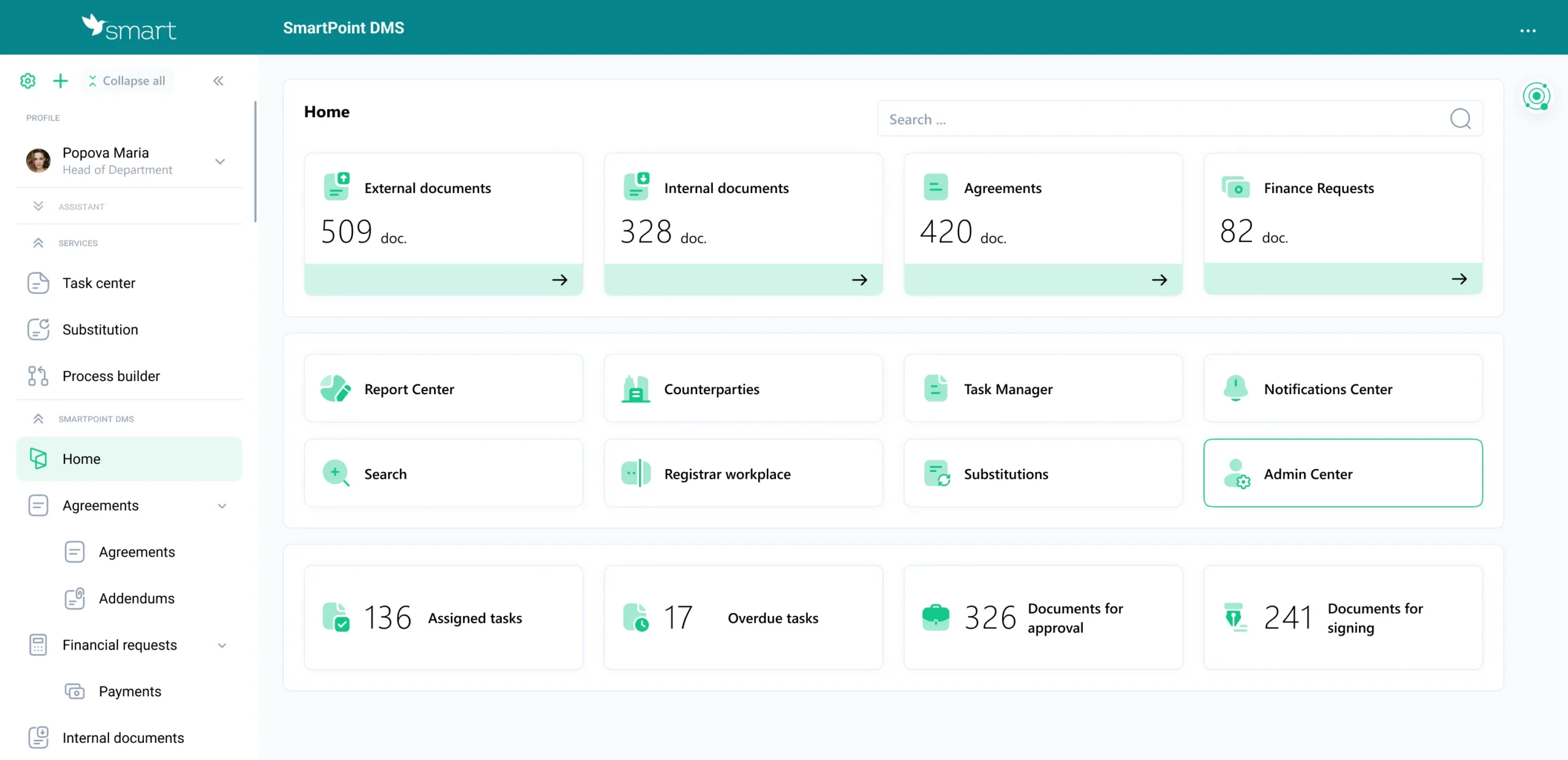
SmartPoint DMS is a modern cloud-based electronic document management system built on Microsoft technologies. It automates daily document operations — creation, approval, signing, storage, and search. The solution covers the full document lifecycle and scales easily as the business grows. The system is composed of modular components that companies can combine according to their workflows, while built-in AI algorithms, together with Microsoft 365 and Power Platform capabilities, significantly speed up document processing and reduce operational costs.
AI in SmartPoint DMS
SmartPoint DMS integrates Microsoft Azure Document Intelligence technologies, offering a suite of capabilities that includes OCR, NLP, and IDP. Thanks to this, the system can automatically:
- Recognize text from images, PDFs, scans, and photocopies
- Extract key metadata such as dates, amounts, contract parties, details, and document numbers
- Classify documents by type
- Create a document card without manual input
- Trigger the appropriate business process (registration, approval, sending for signature, archiving)
OCR and NLP support allows the system to handle documents of various formats and origins — from official contracts to photos of invoices taken on a phone. For companies, this eliminates bottlenecks in document workflows and minimizes human error.
IDP functionality in SmartPoint DMS ensures automatic document routing: if a file contains a payment request, the system triggers the financial process; if it’s a work completion certificate, the corresponding approval workflow starts. This optimization can save dozens of hours each month. Learn more about AI applications in electronic document management here.
SmartPoint DMS Modules
AI-powered tools enhance SmartPoint DMS modules, ensuring fast document processing, flexible data control, and smooth collaboration between users:
- Agreements — This module provides full control over the entire lifecycle of contracts. The system allows the creation and storage of contract and amendment records in a structured format, ensuring transparency and organization in document management.
Flexible approval workflow settings enable multiple review iterations, while version control guarantees that no change goes unnoticed.
Using templates simplifies document creation, and fast search — including for archived documents — allows users to quickly locate files, assign tasks to specific employees or groups, and leave comments for effective collaboration.
- Internal Documents — This module automates handling of all company internal and administrative documents. It covers processing of employee requests such as leave, sick days, business trips, or tender applications.
With integration to electronic document management providers, documents can be signed and exchanged online directly within the system. Task notifications can be sent via Outlook, Teams, or chatbots, making the process highly convenient. Additionally, the module supports scanning with automatic metadata recognition, speeding up document uploads and reducing the risk of errors.
- External Documents — This module manages incoming and outgoing company documents. It allows routing workflows to be configured based on parameters such as document type, amount, or currency.
Integration with EDM providers enables online signing and rapid document exchange with partners or government agencies. Comprehensive record management ensures that all documents go through registration, approval, execution, and archiving, providing full control over the process. Users receive notifications via corporate tools, and task tracking helps prevent delays while maintaining process transparency.
- Financial Requests — This module automates the approval of payment requests and other financial documents. It provides a transparent approval process with ERP integration, making financial operations more controlled and accurate. Each request is accompanied by step-by-step tasks, and automation of payment request processing prevents unnecessary delays. Requests can be approved via notifications or directly in Microsoft Teams, fully integrating the workflow into the company’s daily operations.
Want to see how SmartPoint DMS, enhanced with AI tools, can improve the efficiency of your document workflows? Schedule a consultation and get answers tailored to your business needs.
What to Expect from DMS Solutions in the Next 3–5 Years
The DMS market will undoubtedly continue to evolve, with the coming years defined by several key trends:
Increasing Role of AI
AI in DMS will become more predictive and analytical. Its function will go beyond automating routine tasks — systems will begin offering decision guidance and flagging potential issues before they become critical.
Key development areas:
- Contextual document analysis — Algorithms will not only identify document types but also detect internal data relationships, patterns, and trends. For example, AI could anticipate financial risks based on historical data and counterparty behavior patterns.
- Proactive anomaly detection — The system will highlight unusual indicators, potential conflicts, or inconsistencies before the document reaches the approval stage.
Automation of Complex Processes Previously Done Manually
In the next few years, AI will handle workflows that previously required human intervention:
- Automatic preparation of document bundles for review by multiple departments,
- Generation of analytical insights from combined data across finance, procurement, HR, and other areas.
Data-Driven Decision Support
AI will act as a consultant, not a replacement for managers, providing:
- collection of historical and current data to suggest optimal courses of action,
- recommendations for process optimization based on analysis of large volumes of documents.
Intelligent Analytics as the New Standard
In the medium term, AI will form the backbone of document management analytics, enabling:
- Forecasting workloads for departments and employees based on document volumes and processing timelines,
- Analyzing connections between financial, legal, and operational documents to identify potential risks,
- Early detection of anomalies in documents and trends in approval workflows, allowing timely interventions before business impact occurs.
According to Forbes, citing a PwC (PricewaterhouseCoopers) study, companies that implement even basic AI approaches for data extraction and analysis reduce labor costs for these processes by roughly one-third.
The future of electronic document management will be shaped by an ecosystem built on advanced technologies. This is precisely why SmartPoint DMS holds a significant advantage: it is built on Microsoft technologies, a company setting global standards in innovation, AI, and enterprise software.
SmartPoint DMS evolves proactively — the platform adapts to new capabilities, receives regular updates, integrates with AI tools, and supports technologies that will define how businesses manage documents tomorrow.
Implementing SmartPoint DMS gives you a technological advantage today that will work for your business in the future, and SMART business is here to make it happen!
Frequently Asked Questions about EDMS
What is the difference between DMS and Cloud Storage (OneDrive)?
Cloud storage services allow you to store files, whereas EDMS platforms manage documents throughout their entire lifecycle: creation, approval, signing, archiving, and version control. An EDMS ensures process transparency and integration with business systems, which a simple storage solution does not provide.
Is EDMS secure for sensitive data?
Yes. Modern EDMS solutions use encryption, user activity auditing, and access control, ensuring secure document handling even in industries with strict security standards regarding sensitive information.
What are the three main types of EDMS?
Electronic document management systems can be classified by various parameters, such as document type, purpose, or level of automation. However, they are commonly divided based on access and deployment model:
- On-premises — the system is installed on the company’s servers, and all documents and data remain under the organization’s full control.
- Cloud-based — documents are stored in the cloud and are accessible only to authorized users via secure channels. Scaling and updates are handled automatically.
- Hybrid — combines on-premises and cloud deployment, allowing companies to manage documents flexibly based on accessibility, performance, and corporate security policies.
What is an example of EDMS?
We recommend considering SmartPoint DMS by SMART business — a cloud-based solution built on Microsoft technologies that automates the full document lifecycle and integrates with ERP and CRM systems, as well as AI tools.
Is Google Drive an EDMS?
No. Google Drive is a cloud file storage service. It does not provide the full document lifecycle, approval workflows, or integration with business processes that are characteristic of an EDMS.